 The Flare authoring tool allows you to reuse content both within a project and across projects, as described in the sections below.
Reusing content within a project
You can reuse content within the same Flare project in these ways:
- Including the same topic content in different output targets - Flare allows you to create different types of output targets (for example, responsive HTML5 Help, PDF guides, and Word documents) and reuse some or all of the same topic content in each output target. In most output targets (such as PDF, ePUB, and Word), you can reuse a topic by dragging it into different tables of contents (TOCs) or by reusing a table of contents that includes the topic in different output targets.
Note For HTML5 output, all topics in a project are automatically included in the output (regardless of whether they are included in the TOC) but you can optionally exclude any topics (or folders of topics) by using conditional tags.
- Reusing subtopic content in snippets - Flare supports snippets that allow you to reuse subtopic sections of content in multiple topics in a project. By defining snippets to store content that appears in multiple topics (such as product overviews, definitions, or file paths referenced in documentation), you can simplify maintenance of your documentation by allowing you to edit the content in the snippet and automatically apply those changes to all topics that reference the snippet.
- Using referenced images - After adding a graphic file to a project, you can reuse the same graphic in multiple topics by simply linking to the same graphic from the appropriate topics. Because the graphic itself is not duplicated, any changes you make to the graphic are immediately reflected in all referencing topics.
Each of these methods for reusing content within a project are described in detail within the Flare Help. Reusing content across projects, as described in the next section, is more complicated to implement and in many ways dependent on the structure and organization of your projects—which is why it's worth a closer look here.
Reusing content across projects
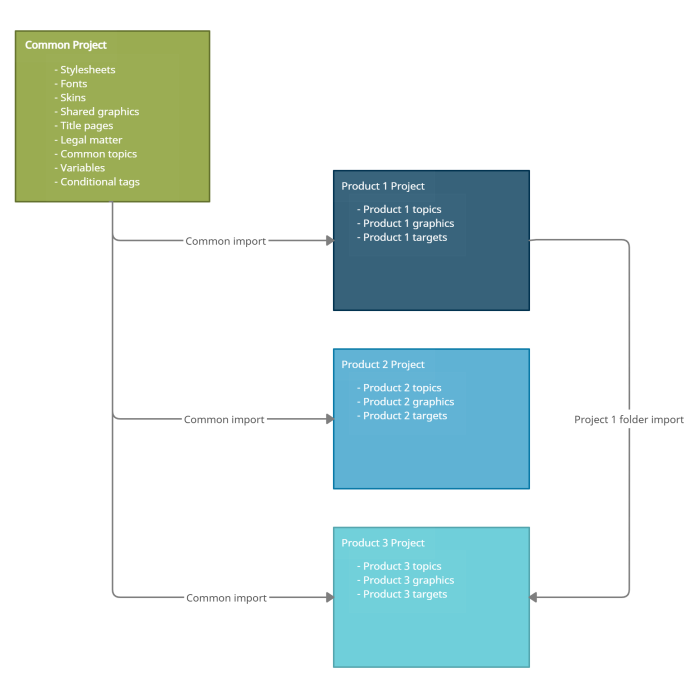
Reusing content across projects is a powerful way to simplify maintenance by designing projects that share the same configuration files and reuse common topic content. For example, the illustration on this topic shows a common project that defines several configuration files that are automatically imported into documentation projects for different products. The shared files include:
- Style sheets that format content in different output formats
- Fonts used in topic content
- Skins that customize the layout and color scheme of Help systems
- Shared graphics (such as a logos and product branding graphics)
- Title pages used to ensure consistent branding across print-based output targets
- Common topic content used in projects, such as legal notices, contact information, and documentation for writing conventions
- Variables that are common to multiple products and define frequently changed values, such as the current publishing year, or version numbers or words that are target-dependent (such as "guide" or "Help")
- Conditional tag types that are common to multiple products, such as a Common.Commented condition for excluding content, or Common.PrintOnly or Common.HelpOnly conditional tags for distinguishing between media intended for print or online viewing
Using this configuration, Flare automatically imports the common content each time you build an output target—thereby ensuring that the latest changes are always included in published output. By reusing common elements across the projects in your environment, you ensure consistency (making it easier for authors to move between projects) and simplify maintenance, by causing changes in one project to automatically update all others.
Tip In cases where shared content applies to only select projects, rather than all projects, you can configure Flare to import content from the appropriate projects only. For example, if Product 1 includes a component that is also packaged with Product 3, then you can author the documentation for the shared component in Product 1, and then automatically import the shared content to Product 3 each time that you build that product's output targets (as shown in the illustration).
To get started setting up Flare projects for content reuse, let's take a look at how to create and configure the common project.